
Unlocking Creativity: A Dive into the Obsidian Note-Taking App
First Impressions of Obsidian
PRODUCTIVITY
Introduction to Obsidian
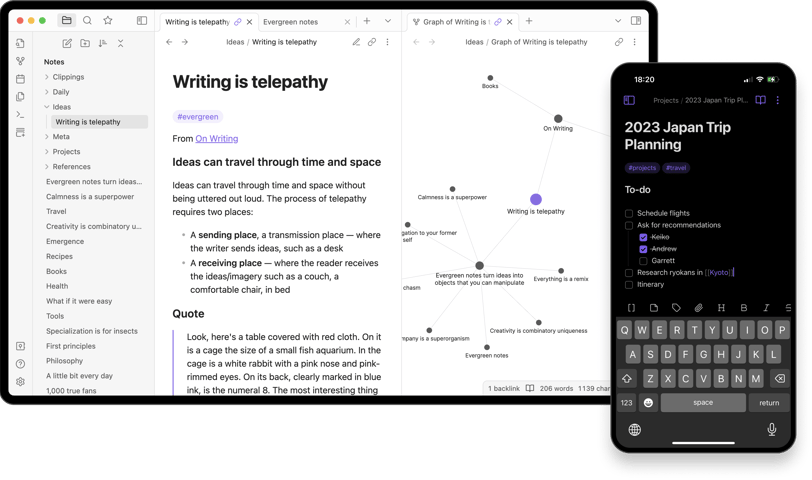
If you're on the hunt for a powerful note-taking app that caters to both simplicity and depth, look no further than Obsidian. This sophisticated tool uses markdown for formatting, making it not just user-friendly but also a breeze for tech enthusiasts. Obsidian stands out primarily because of its ability to link documents effortlessly. This means you can create a comprehensive note and branch off into numerous smaller, specific notes that link back to your main ideas. It’s a total game-changer for organizing thoughts and research!
Power of Linking and Organization
One of my absolute favorite features of Obsidian is the linking capability. Imagine crafting a general note about a big topic and then being able to jot down all related subtopics as smaller notes, each interconnected yet distinct. This creates a web of knowledge that is not only easy to navigate but also deeply enriching. You can create a context around your notes, making it much simpler to see how ideas connect, which is often where some of the best insights can be found.
Exploring the Graph View
Another standout aspect of Obsidian is the graph view. This feature allows you to visualize your notes as clusters, revealing how each idea branches off from one another. It's like having a mental mind map that grows and evolves as you add more ideas. This visual representation can be extremely beneficial for those who like to see their thoughts laid out clearly, as it helps discover new connections and areas for further exploration.
Syncing: The Challenge of Convenience
While Obsidian has so many amazing features, syncing can be a slight headache depending on how you choose to go about it. The built-in paid sync option costs around $4 per month, which can be a convenient choice for those who prefer a straightforward setup. However, if you're like me and enjoy using platforms you might already have, you can opt for syncing with Google Drive, OneDrive, or Dropbox. For those who love experimenting, you can even roll your own sync with a community plugin called Livesync. Just keep in mind that while these options are handy, they can require a bit of setup.
Conclusion
In summary, Obsidian is an innovative note-taking app that brings organization, creativity, and collaboration to the next level. With its markdown formatting, linked documents, and exceptionally useful graph view, it’s perfect for anyone looking to enhance their note-taking process. While syncing might need some consideration, the overall benefits of using Obsidian far outweigh the challenges. Give it a try, and get ready to revolutionize how you take notes!
Links to Amazon are Associate Links.